Referring Domains vs Backlinks: Counts, Scope, and Limits
Learn how referring domains differ from backlinks, why provider counts vary, what a limited domain sample can show, and what requires a full backlink report.
What Are Referring Domains?
Referring domains are deduplicated domains that a backlink provider found linking to a target site. If example.com links from ten pages, that is ten backlinks but one referring domain in that provider's dataset.
If three different domains each link once, the report contains three backlinks from three referring domains. This distinction helps separate link volume from the number of independent domain sources.
Check a referring-domain count and sample →
Referring Domains vs Backlinks
| Term | Unit being counted | Example |
|---|---|---|
| Backlink | One discovered link from a source URL to a target | 50 links from five domains = 50 backlinks |
| Referring domain | One deduplicated linking domain in the provider's index | 50 links from five domains = five referring domains |
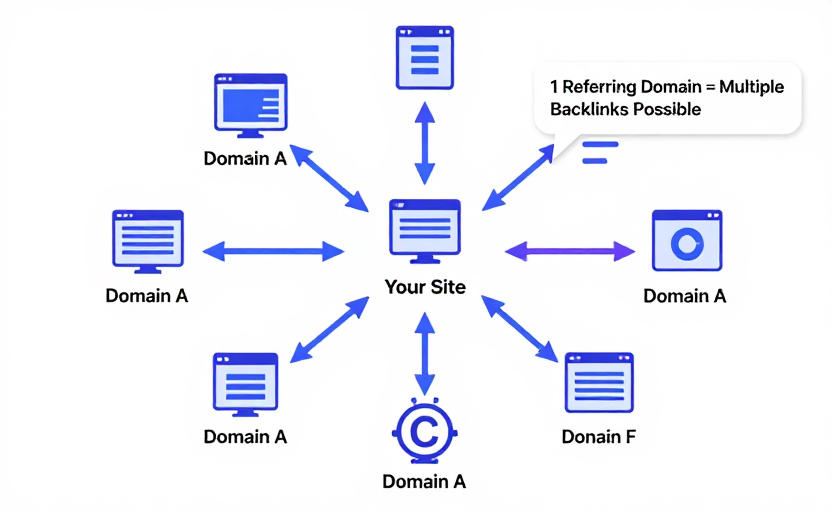
Providers can count hosts and subdomains differently, canonicalize URLs differently, and crawl different parts of the web. A count is meaningful only with its provider, target scope, and snapshot context.
What the Count Can and Cannot Tell You
A referring-domain count can help you:
- Compare source diversity using the same provider and scope
- Find domains worth inspecting in a complete backlink report
- Notice large directional changes when measured consistently
- Build an outreach or competitor-research starting list
The count cannot tell you:
- Whether a specific link is editorial, relevant, followed, sponsored, or still live
- Which source URL links to which target URL
- Whether Google values or ignores a link
- Whether a domain is trustworthy from DR, DA, TF, or Spam Score alone
- Whether the provider has found every link on the web
More domains are not automatically better. A relevant editorial mention and an automated directory entry both add a domain to a raw count, but they do not have the same context or value.
Why Provider Counts Differ
Backlink indexes crawl on different schedules and have different discovery, deduplication, and retention rules. Differences can come from:
- Index coverage. One crawler may not have discovered a source page yet.
- Target scope. A domain, subdomain, protocol, exact URL, and URL prefix are different targets.
- Host normalization. Providers may handle
www, subdomains, redirects, and international domains differently. - Freshness. A removed link may remain in one index longer than another.
- Display limits. A free report may expose a sample even when the provider reports a larger total.
For repeat comparisons, use the same provider, target scope, and observation interval.
How DR Checker's Referring Domains Tool Works
- Enter one public domain in the Referring Domains Checker.
- The checker requests the current source page and parses a provider-reported total when present.
- It deduplicates the domain names returned by that source.
- The result displays the reported total separately from the returned sample and shows up to 30 domain links.
An empty sample means this source returned no domains for that request. It does not prove that the domain has no backlinks in another index or on the web.
The tool does not currently provide source URLs, target URLs, anchor text, link attributes, new/lost history, or export. Use a complete backlink product when those fields are required.
How to Evaluate a Returned Domain
Treat each returned domain as a lead for investigation:
- Find the exact linking page and confirm the link still exists
- Check topical relevance and whether the mention is editorial
- Inspect the page's real audience, content quality, and outbound-link pattern
- Note the target page, anchor, and link attributes
- Use vendor scores only as supporting context
Do not disavow a link solely because a third-party domain score is low or a Spam Score is high. Google says most sites do not need its disavow tool; it is intended for specific substantial unnatural-link situations.
Getting More Relevant Referring Domains
Focus on reasons an independent site would cite you:
- Publish original research, datasets, or reproducible methods
- Build a useful free tool or reference asset
- Contribute qualified expert commentary to relevant publications
- Maintain accurate documentation people can cite
- Find genuinely relevant unlinked mentions or broken resources
Avoid buying ranking links, mass exchanges, or automated directory campaigns. Increasing the provider count is not the goal; earning useful editorial references is.
Referring Domains and Other Metrics
| Metric | Provider | Useful question |
|---|---|---|
| Referring Domains | Backlink-data provider | Which unique domains did this index find? |
| Domain Rating | Ahrefs | How strong is the domain's backlink profile relative to others? |
| Domain Authority | Moz | How likely is the domain to rank relative to competitors in Moz's model? |
| Spam Score | Moz | Which domains deserve closer correlation-based investigation? |
| Trust Flow | Majestic | How does Majestic summarize backlink quality? |
These metrics come from different indexes and models. Combining them can produce better questions, not a universal quality verdict.
FAQ
What Is a Good Number of Referring Domains?
There is no universal good count. Compare the same provider's data for relevant competitors, then inspect the exact linking pages and context.
Do Referring Domains Directly Determine Rankings?
No. A third-party referring-domain count is not a Google ranking factor. Google evaluates links with its own systems, while relevance and page-level factors still matter.
Is One Domain With Many Links Worth Less Than Many Domains?
The counts describe different diversity patterns, but there is no unconditional numerical rule. Link value depends on the source page, relevance, placement, audience, and many other factors.
How Often Should I Check?
Use a consistent interval that matches your link-acquisition activity and compare the same provider and target scope. A full new/lost report is better when exact change tracking matters.